Google Cloud Compute Engine and Basic Networking
Introduction
In this tutorial, we will understand how Linux servers work in a traditional environment and how the same concepts are implemented in Google Cloud Platform (GCP).
This document is designed for beginners who are starting their Google Cloud journey.
- Core building blocks of Google Cloud (Organization, Folder, Project)
- How a Linux server maps to a Compute Engine VM
- Networking basics: VPC, Subnets, Public/Private IPs
- How AWS and GCP networking differ
- Hands-on: Create a VM, install Nginx, and open it to the internet via a firewall rule
What is Cloud Computing
Cloud computing is the practice of using computing resources over the internet — without buying or managing physical hardware.
Typical cloud resources include:
- Servers
- Storage
- Networking
- Databases
- Applications
Instead of purchasing and maintaining physical servers, cloud providers offer resources on-demand.
Popular cloud providers:
- Google Cloud Platform (GCP)
- Amazon Web Services (AWS)
- Microsoft Azure
Introduction to Google Cloud Platform
Google Cloud Platform (GCP) is Google's cloud computing platform.
It provides services such as:
- Virtual Machines (Compute Engine)
- Networking (VPC)
- Storage (Cloud Storage, Persistent Disk)
- Kubernetes (GKE)
- Databases (Cloud SQL, Spanner, Firestore)
- Monitoring (Cloud Monitoring)
- Security Services (IAM, KMS)
Official Website: cloud.google.com
Create a Google Cloud Account
To start using Google Cloud:
- Create a Google account
- Open the Google Cloud Console
- Activate the free trial
- Create your first project
:::note Free credits Google Cloud provides free credits for new users — great for learning and experimenting. :::
Console Link: refer here
Google Cloud Resource Hierarchy
Google Cloud organizes resources using a clear hierarchical structure.
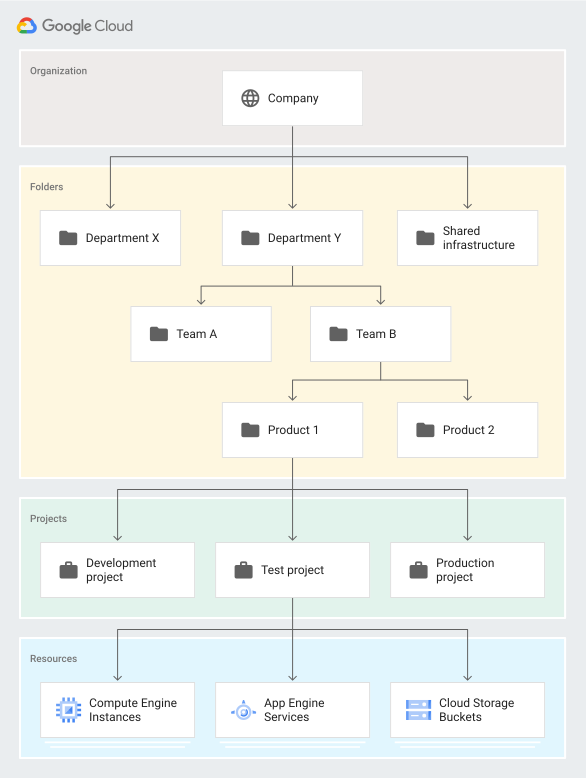
Reference:
Hierarchy Structure
Organization
 ├── Folder
 │    ├── Sub Folder
 │    │      └── Project
 │    └── Project
 └── Project
Organization
The Organization is the top-level container in Google Cloud.
Example:
company.com
It is usually connected to:
- Google Workspace
- Your company domain
Folder
Folders help organize projects logically. They can also contain nested folders.
Examples:
Production
Development
Testing
Finance
Engineering
Project
Projects are the main working units in Google Cloud — all resources live inside a project.
Examples of resources inside a project:
- VM Instances
- VPC Networks
- Databases
- Storage Buckets
I know cloud
For any cloud platform, Compute and VPC are the two most fundamental services. Once you truly understand these two services, you can confidently say you know that cloud.
Linux Server Basics
Before creating a VM in Google Cloud, let's revisit the components of a typical Linux server.
A Linux server contains:
- Operating System
- CPU
- RAM
- Disk / Storage
- Private IP Address
- Public IP Address
Operating System
The OS manages the server's hardware and software.
Examples:
- Ubuntu
- CentOS
- Debian
- Red Hat Enterprise Linux
CPU and RAM
- CPU performs computations.
- RAM holds temporary running data for applications.
Example specification:
2 vCPU
4 GB RAM
Disk and Storage
Storage holds:
- Operating System files
- Application files
- Logs
- Databases
Common types:
- HDD
- SSD
- Persistent Disk (in cloud)
Private IP Address
Used for internal communication within the network. Not directly reachable from the internet.
Example:
10.0.0.5
Public IP Address
Used for internet access — allows external users to reach the application.
Example:
34.x.x.x
Mapping a Linux Server to a Google Cloud VM
In Google Cloud, virtual servers are called Compute Engine Virtual Machines.
A Compute Engine VM is still a Linux server — it just runs in the cloud instead of on a physical machine you own.
Shared Responsibility
| Google Cloud manages | You manage |
|---|---|
| Infrastructure | Operating System |
| Physical Hardware | Applications |
| Networking | Configurations |
| Hypervisor Layer | Data |
High-Level Networking Introduction
Why a VM needs networking
A VM needs networking for:
- Internal communication
- Internet access
- Application access from users
- Server-to-server communication
Core networking components:
- VPC
- Subnets
- Routes
- Firewall Rules
Public IP vs Private IP
| Type | Purpose | Reachable from internet? |
|---|---|---|
| Private IP | Internal communication | No |
| Public IP | Internet access | Yes |
What is a VPC
VPC stands for Virtual Private Cloud — a logically isolated network inside Google Cloud where your resources communicate securely.
AWS vs Google Cloud Networking
| Feature | AWS | Google Cloud |
|---|---|---|
| VPC Scope | Regional | Global |
| Subnet Scope | Availability Zone specific | Regional |
| Zone Selection | Subnet tied to AZ | Zone selected during VM creation |
| Same Subnet Across Zones | No | Yes |
AWS Networking Architecture
In AWS:
- VPC is regional
- Subnets are Availability Zone specific
VPC (us-east-1)
 ├── Subnet-A (us-east-1a)
 └── Subnet-B (us-east-1b)
Google Cloud Networking Architecture
In Google Cloud:
- VPC is global
- Subnets are regional
Global VPC
 └── Subnet (us-central1)
       ├── VM in us-central1-a
       ├── VM in us-central1-b
       └── VM in us-central1-c
:::important Remember this In Google Cloud:
- A subnet belongs to a region
- A VM belongs to a zone
- The same subnet can be used across multiple zones inside the same region :::
VM Networking Flow
Internet
   ↓
Public IP
   ↓
Firewall Rule
   ↓
VPC Network
   ↓
Subnet
   ↓
Virtual Machine
Practical Demo
Step 1 — Create a VPC Network
Navigate to:
VPC Network → VPC Networks
Create:
- Custom VPC
- Regional Subnet
Example configuration:
VPC Name:    demo-vpc
Subnet Name: demo-subnet
Region:      us-central1
CIDR:        10.10.0.0/24
Step 2 — Create a Compute Engine VM
Navigate to:
Compute Engine → VM Instances
Configure the following fields:
- VM Name
- Region
- Zone
- Machine Type
- OS Image
- VPC
- Subnet
- Public IP
Example VM configuration
| Component | Value |
|---|---|
| Name | nginx-server |
| Region | us-central1 |
| Zone | us-central1-a |
| OS | Ubuntu |
| Machine Type | e2-medium |
| VPC | demo-vpc |
| Subnet | demo-subnet |
Step 3 — Connect to the VM
Use SSH from the Google Cloud Console.
Update package lists:
sudo apt update
Step 4 — Install Nginx
sudo apt install nginx -y
Start Nginx:
sudo systemctl start nginx
Enable Nginx to start on boot:
sudo systemctl enable nginx
Verify status:
sudo systemctl status nginx
Step 5 — Try to Access the Application
Open a browser:
http://PUBLIC_IP
:::warning Expected behavior At this point the application will not load — Google Cloud blocks all incoming traffic by default. We need a firewall rule. :::
Firewall Introduction
Why a Firewall Rule is Required
Google Cloud blocks incoming traffic by default. To allow HTTP traffic, port 80 must be opened.
Create a Firewall Rule
Navigate to:
VPC Network → Firewall
Create the rule with these values:
| Field | Value |
|---|---|
| Name | allow-http |
| Direction | Ingress |
| Targets | All instances |
| Source IP | 0.0.0.0/0 |
| Protocols | TCP:80 |
Firewall Networking Flow
Internet
   ↓
Firewall Rule (Allow TCP 80)
   ↓
VM Instance
   ↓
Nginx Application
Verify Application Access
Open the browser again:
http://PUBLIC_IP
The default Nginx welcome page should now load successfully. 🎉
What's Next (Covered in Later Videos)
This tutorial covered only the basics of firewalls and networking. Advanced topics will be covered in upcoming videos:
- Firewall Policies
- Allow / Deny Rules
- Target Tags
- Service Accounts
- Priority Rules
- Internal Traffic Rules
- Load Balancer Security
- Advanced Networking & Security
Diagram Placeholders
Add the following diagrams to enhance the tutorial:
- Resource Hierarchy Diagram
- AWS vs GCP Networking Comparison Diagram
- VPC and Subnet Architecture Diagram
- VM Networking Flow Diagram
- Zone Placement Diagram
Summary
In this tutorial we:
- Understood what cloud computing is and what GCP offers
- Explored Google Cloud's resource hierarchy (Organization → Folder → Project)
- Mapped Linux server concepts to Compute Engine VMs
- Compared AWS and GCP networking models
- Created a VPC, subnet, and VM
- Installed Nginx and exposed it to the internet via a firewall rule
In the next video, we will dive deeper into firewall policies, advanced VPC features, and real-world networking scenarios.